Showing posts with label NoSQL. Show all posts

Wednesday, 25 July 2018

NoSQL: What is a Cassandra Query Language (CQL)?

NoSQL Cassandra CQL
The Cassandra Query Language (CQL) is the primary language for working with Cassandra Database.
You can easily interact with Cassandra using the CQL shell (cqlsh).
The latest version of Cassandra Query Language is v3.3.1. (as per April – 2016).
You can visit full help of CQL at the official link of Apache Cassandra(CQL).
For the RDBMS people, it is very easy to learn and migrate in Cassandra because most of the syntax of CQL is very similar to SQL.
You can also use DataStax DevCenter for graphical tool.
Using CQL, you can perform all DML and DDL statements, you can also create User Defined Functions, Types, Roles, Triggers, Aggregate Functions and many more.
It is also useful in knowing the information related to clusters, Keyspace structure and other meta information.
There are also some limitations of CQL.
CQL doesn’t support aggregation like max, min, ava, group by and having.
CQL doesn’t support Joins and Wildcard queries.
CQL doesn’t support Union and Intersection.

NoSQL: Key concepts of the Cassandra Architecture (Day 1)

As I started to learn and post about the Apache Cassandra so in this post, I am going to share some of the important Key concepts of the Cassandra Architecture.
Data Replication:
Cassandra supports high availability by implementing the Data Replication.
One logical database is spread among the multiple Nodes of the Cluster, and it creates different replicas of the Nodes.
If one Node goes down, another Node is available with the data, so it avoids a single point of failure.
Consistent Hashing Algorithm:
Actually, there are primary two problems with the distributed database system, The first is, every time determining a Node with the specific data set and The second is, require to reduce the data movement when adding or removing Nodes.
The Consistent Hashing Algorithm achieves this problem by storing Cassandra row keys to physical nodes.
Data Consistency:
As data is replicated across the different nodes, it ensures that data is synchronised across all the replicas. Before any operation on the nodes, it checks the last update value and version of the data.
It also provides the tunable consistency in which user can determine the consistency level.
Gossip Protocol:
Cassandra is using Gossip Protocol in which all Nodes discover information about the other nodes by exchanging information with each other.
Because of the network traffic, Nodes cannot exchange the information of all nodes, but it can exchange information maximum of 3 nodes.
Snitches and Replication Strategies:
Cassandra uses snitches and replication strategies to determine how data is replicated across all data centres and nodes.
The Snitches determine the how each node uses near to each other in the ring and Replication strategies this information to determine location information for each copy of the data.
Bloom Filters:
A bloom filter tests the existence of a data structure, and it checks that items are available in the set or not. It also reduces CPU I/O operation because it is swift.
Merkle Tree:
It is one type of hash tree, and it uses for finding the differences between the Nodes.
SSTable:
A Sorted String Table is ordered key-value map which is storing large sorted data.
Write Back Cache:
A Write Back Cache is only for writing operation in which write operations can use the dedicated cache.
Memtable:
A memtable is residing in the memory and manage the data of Write Back Cache.
Cassandra Keyspace:
It is similar to RDBMS schema or database. It is container of all types of data and objects.
Cassandra Column Family:
It is similar to RDBMS table and it contains column and data related information.

NoSQL: Cassandra Architecture – Read and Write operations in The Ring (Day 2)

n the previous day, I shared some of the essential key concepts of the Cassandra Architecture.
In this post, I am sharing the basic architecture of reading and writing operations of Cassandra.
Cassandra Ring:
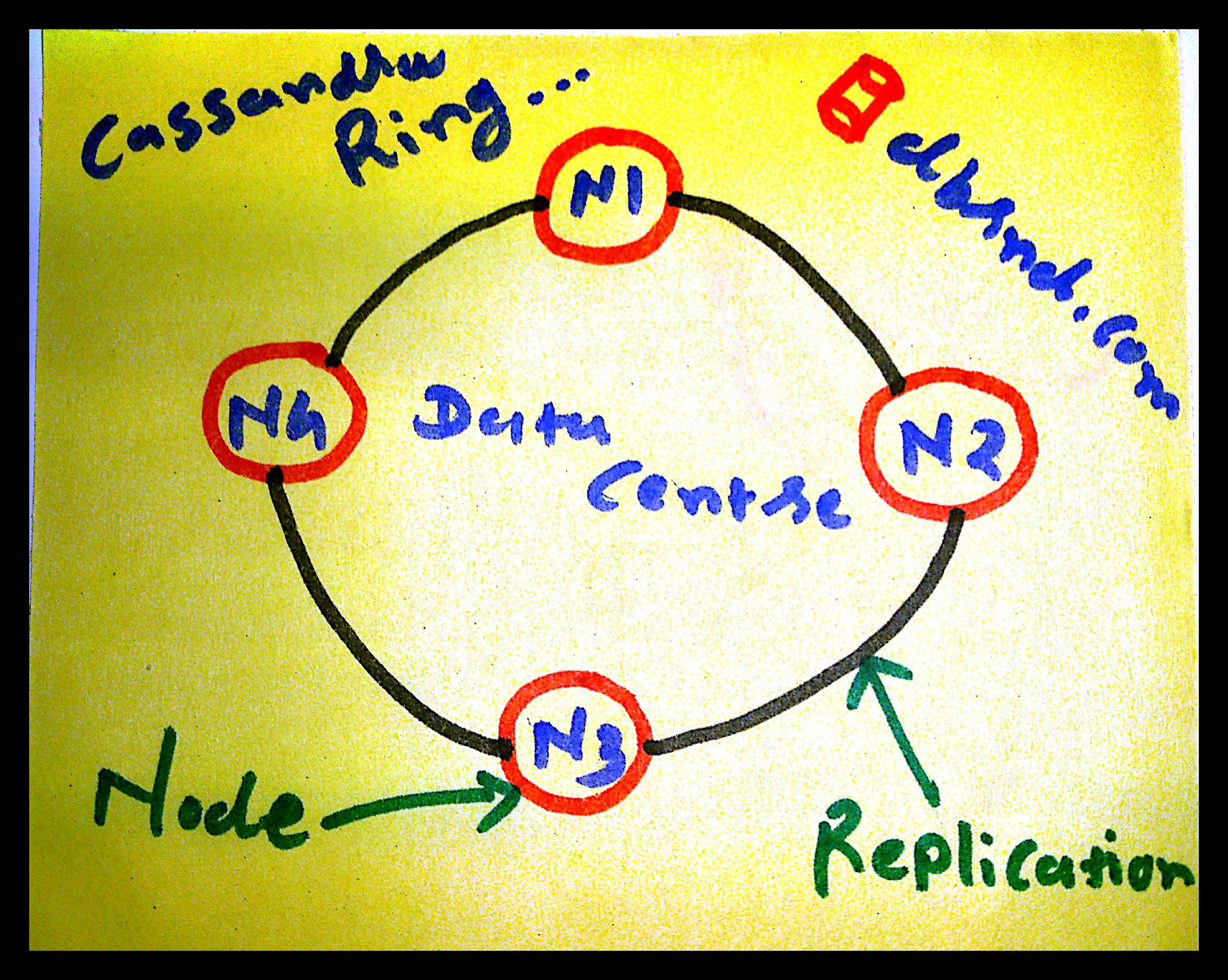
Cassandra is using a consistent hashing algorithm to treat all nodes of the cluster equally.
NoSQL Cassandra Ring
A Cassandra cluster is visualised as a Ring in which different nodes are participating with the same name. It can exchange state information with a maximum of three other nodes.
A token range assigns to each node which determines its position in the cluster.
Cassandra is using Gossip Protocol so whenever any node starts, it obtains information about the other nodes by exchanging information with each other.
A Partitioner is responsible for preparing the set of data for each node.
Cassandra has three different types of Partitioners, Murmur3Partitioner (default), RandomPartitioner and a ByteOrderedPartitioner.
Each node is performing replications of data basis on defined replication strategy. Basically there two types of replication strategy, one is Simple Strategy and second is Network Topology Strategy.
A Simple Strategy works in the clockwise, and Network Topology works for multiple data centres.
How it executes Write Operations?
A Cassandra is Masterless distributed architecture, and there is no any Master and Slave mechanism like any other distributed system.
NoSQL Cassandra Architecture
At any given point in time, the client can connect to any node and that connected node called as a coordinator.
Based on the partition key and replication strategy, Coordinator forwards and replicates data to all applicable nodes.
Each node processes the request individually.
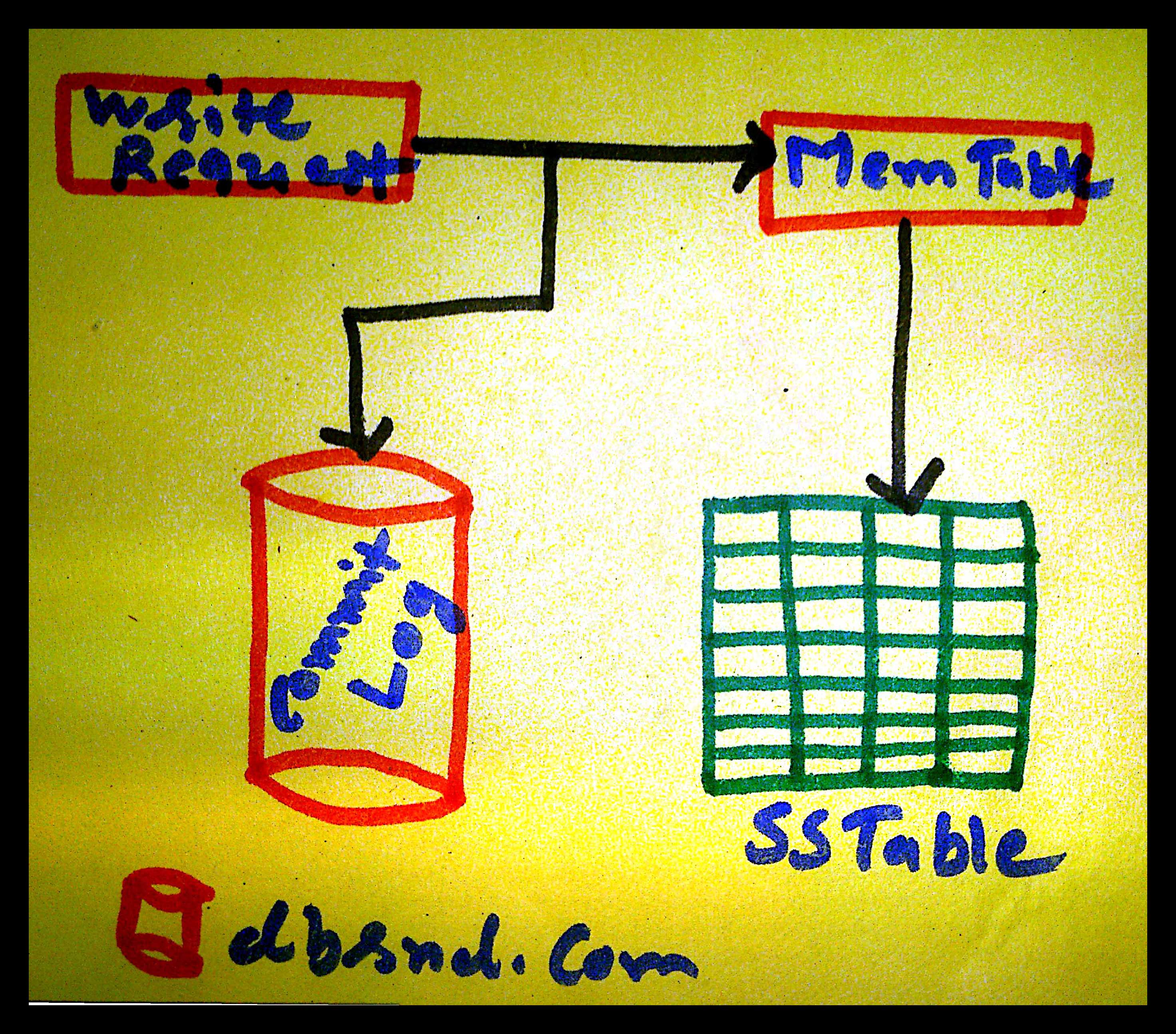
Every node first writes data into the commit log and then writes into the memtable.
The commit log ensures the durability because memtable is dealing with memory so whenever data is lost then we can use commit log to restore the data.
Whenever memtable is flushed or full, it is written to the SSTable (Sorted String Table) of the disk.
Every SSTable creates three files on the disk which include a bloom filter, a key index and a data file. Over a period, a number of SSTables are created.
How It executes Read Operations?
As Cassandra is Masterless architecture so clients can connect to any node of the cluster ring.
Like write operation, chosen node is called as coordinator and is responsible for returning the requested data.
A row key must be supplied for every read operation. The coordinator uses the row key to determine the first replica.
If replica has a different version of the data, coordinator returns the latest version to the client by issuing read repair command with the older version of the data.
Each read request fetches the data from memtable and SSTables after that it merged this data and returned to the coordinator.
Internally SSTables are using a Bloom Filter to check requested row key whether it exists in SSTable or not.

NoSQL: Install Single Node Cassandra 3.5 on Ubuntu 14.04

Now, I am going to learn and share NoSQL Apache Cassandra practical demonstration.
In the previous series of articles, I shared a basic theory about NoSQL and Apache Cassandra.
In this post, I am providing steps to install Single Node Cassandra Cluster on Ubuntu 14.04.
Step 1:
Cassandra requires Oracle Java Runtime Environment.
Install Oracle Java Virtual Machine.
Add Oracle JRE package.
Step 2:
Update the database package:
In the second step, If you get any error like: “unable to lock directory /var/lib/apt/lists/”
Step 2.1: 
Search running apt-get processes:
Step 2.2:
If any process is running as apt-get, kill it
Step 3:
Accept the license agreement and install the Oracle JRE.
Step 4:
After successfully installtion, verify JRE Version.
Step 5:
Install Cassandra from the official Apache Software Foundation repositories.
The latest tick-tock release is Cassandra 3.5, released on 2016-04-13.
Below commands to add repository source from www.apache.org.
In the below command, you can change the value of 35x version. e.g, for version 3.5 = 35x, for version 2.2 = 22x.
Step 6:
Require to add three public key from the Apache Software Foundation.
First key:
Second key:
Third key:
Step 7: 
Update the package.
Step 8:
Install Cassandra.
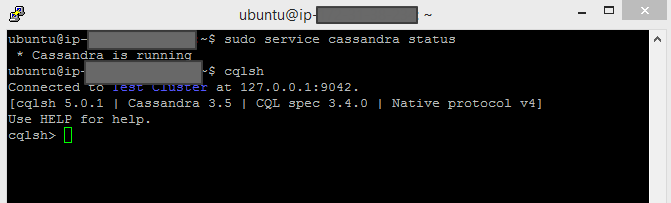
Step 9:
Check the status of Cassandra Service.
Step 10:
You can also check the status of cluster.
status UN means Up and Normal.
Step 11:
Now, You can connect Cassandra Query Language command line interface.

Install NoSQL Cassandra 3.5