Showing posts with label Linux Interview Questions. Show all posts

Monday, 5 August 2019

Must read unix/Linux shell scripting interview questions

Unix is used everywhere and knowledge of the operating system is must for any interview. Here are the must read  unix shell scripting interview questions

1) What is Shell Script?
Answer
A shell script is a collection of command which are executed in a order given. There are conditional statement and looping also available like if ,while which helps in finding if a particular value is greater than another value .
To write any comments in the shell scripts ,it has to be written with # preceded
2) What are different type of shell available?
Answer
ShellDescription
Bourne shellThis is the original Unix shell written by Steve Bourne of Bell Labs. It is available on all UNIX systems.
Below is written  in the beginning of shell scripts to specify the shell to use for the scripts. The default prompt on the Unix for this is $
#!/bin/bsh
C shellThis shell was written at the University of California, Berkeley. It provides a C-like language with which to write shell scripts – hence its name.The default prompt on the Unix for this is %
Below is written  in the beginning of shell scripts to specify the shell to use for the scripts
#!/bin/csh
Korn shellThis shell was written by David Korn of Bell labs. It is now provided as the standard shell on Unix systems. It provides all the features of the C shell with a shell programming language similar to that of the original Bourne shell. It is the most efficient shell. Consider using this as your standard interactive shell.The default prompt on the Unix for this is $Below  is written in the beginning of shell scripts to specify the shell to use for the scripts
#!/bin/ksh
3) How will you find which operating system your system is running on in UNIX?
Answer
By using command “uname -a” in UNIX
4) How do you find which processes are using a particular file?
Answer
By using fuser command in UNIX. It wills list down PID of all the process which is using a particular file.

unix shell scripting interview questions
5) What is the use of “$?” sign in shell script ?
Answer
This is used to find the status of last executed command
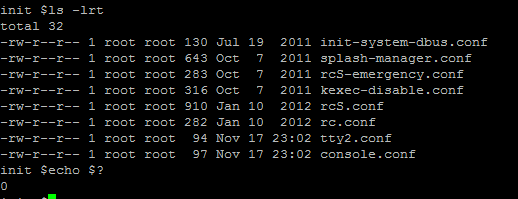
unix shell scripting interview questions
6) How to make a shell script executable ?
Answer
Using the chmod command we can make a shell script executable.
This chmod command makes the shell script file “test.sh” executable for the user (owner) only:
$ chmod u+x test.sh
this syntax makes it executable for all (everyone):
$ chmod a+x test.sh

7) How to put comments in your shell script ?
Answer
Comments are the messages to yourself and for other users that describe what a script is supposed to do and how its works.It also help in understanding the script in future. To put comments in your script, start each comment line with a hash sign (#) . Example is shown below :
#!/bin/ksh
# This scripts  is created by techgoeasy.com
echo “$ORACLE_HOME” #!/bin/ksh
# This scripts  is created by techgoeasy.com
echo “$ORACLE_HOME”
8) How do you find the uptime of the Unix box?
Answer
By using uptime command in UNIX
or who -r

9) How do you find which process is taking how much CPU?
Answer
By using “top” command in UNIX
10)  How to find the last 10 lines of the files
Answer
tail -10 <file name>
11)  How to count the occurence of the word “oracle” in the file loader.txt?
Answer
grep -c “oracle” loader.txt
12)  How do you find which remote hosts are connecting to your host on a particular port say 8000?
Answer
By using netstat command execute netstat -an | grep “port”
netstat -an|grep 8000

13) You have a comma separated file which contains seqno, Name and Address, We have to write command to list down all names without seqno and Addresses?
Answer
you can either you AWK or CUT command here.
cut -d”;”  -d2  filename
or
cat filename|awk -F”;” {print $2}’
14) What is the use of break  and continue command ?
Answer
The break command is a simple way to escape out of a loop in progress. We can use the break command to exit out from any loop, including while and until loops.
The continue command is identical to break command except it causes the present iteration of the loop to exit, instead of the entire loop. Continue command is useful in some scenarios where error has occurred but we still want to execute the next commands of the loop.
15)  What is the Syntax of “Case statement” in Linux shell scripting ?
Answer
The basic syntax is shown below :
case word in
type1)
Statement(s) to be executed if type1 matches
;;
type2)
Statement(s) to be executed if type2 matches
;;
type3)
Statement(s) to be executed if type3 matches
;;
esac
16) What is the syntax of for loop in shell script ?
Ans: Basic Syntax of for loop is given below :
for variables in list_of_items
do
command1
command2
….
last_command
done
17) How to debug the shell scripts?
Answer
We can debug shell script by running that with option -x
ksh -x test.sh

18)
How to test files in a shell script ?
Answer
command is used to perform different test on the files. Basic test are listed below :
Usage
-d filename
Returns true if the file exists and is a directory
-e filename
Returns true if the file exists
-f filename
Returns true if the file exists and is a regular file
-r filename
Returns true if the file exists and have read permissions
-s filename
Returns true if the file exists and is not empty
-w filename
Returns true if the file exists and have write permissions
-x filename
Returns true if the file exists and have execute permission

19) How do you find the IP address of the Unix machine or if the IP address is given ,the name of the machine
Answer
We can use nslookup command for that
20)What are inodes?
Anwser
it ’ is a ‘data-structure’, which is used for file identification on Linux. Each file on an Unix System has a separate ‘inode’ and an ‘Unique’ inode Number.

21) How do you check if a particular process is listening on a particular port on remote host?
Answer
By using telnet command for example “telnet hostname port”, if it able to successfully connect then some process is listening on that port.
22)  How to list the files in the directory?
Answer
By using the command ls . we have various option available there
23) How to find the filesystem size,user space, free space?
Answer
df -h .
or
df -k .
24) How to perform arithmetic operation ?
Answer
two ways to perform arithmetic operations :
1. Using expr command (# expr 1+ 2 )
2. using a dollar sign and square brackets ( $[ operation ] ) Example : test=$[1 + 4] ; test=$[1 + 4]
25)  How to search for the file in Unix operating system?
Answer
We can use find command for that
find . -name “<filename>”  -print
26)  How to use awk command ?
Answer
27) How to unset or de-assign variables ?
Answer
‘unset’ command is used to  unset a variable. Syntax is shown below :
# unset <Name_of_Variable>
28) What is nohup in UNIX?
Answer
nohup is a special command which is used to run process in background, but it is slightly different than & which is normally used for putting a process in background. An UNIX process started with nohup will not stop even if the user who has stared log off from system. While background process started with & will stop as soon as user logoff.
29) How do you set environment variable which will be accessible form sub shell?
Answer
By using export command, for example export var=x will be available on all sub shell.
30) How do you copy file on the same host or on the remote host?
Answer
we can use cp command for the same host
rcp or scp is used for copying on the remote host

Friday, 2 August 2019

Linux - INTERVIEW QUESTIONS AND ANSWERS

Vi:

1.What are editors in Linux/UNIX OS?
2.A different list of editors available in Linux OS?
3.What is Vi editor?
4.How to create a new file with Vi editor?
5.How to save and exit the file in vi editor?
6.How to move a page forward in the file?
7.How to move a page backward in the file?
8.How to move half page forward and backward in the file?
9.How to search for the string in a file?
10.How to search for a string from the bottom of the file?
11.How to insert content using vi editor?
12.How to delete a line in vi editor?
13.How to delete multiple lines in vi editor?
14.How to copy and paste in vi editor?
15.Vi editor cheat sheet?

umask:

1.What is umask in Linux and UNIX machines?
2.What is the use of umask in Linux servers?
3.What are the original file and directory permissions in Linux machine?
4.What is umask default value?
5.How to change the umask value?
6.What are the configuration files related to umask values?

Head &

1.How to list top 10 lines of a file?
2.How to list the top 4 lines of a file?
3.How to list the bottom 3 lines of a file using the tail command?
4.What is the use of tail -f command?
5.How to see continuous updates of a file?

more & less:

1.How to display the content of a using more command?
2.How to display the content of a using less command?
3.What are the differences between the cat, more & less commands?

find:

1.How to search for a file in Linux/UNIX system?
2.Command to search for a file based on its name in Linux?
3.How to search for files starting with "ab" characters?
4.find command syntax to search for a file in particular directory?
5.How to search for files based on the size limit in Linux?
6.How to list out the files which are accessed 2 days ago in a directory?
7.How to list out the files which are modified 4 days ago in Linux?
8.Search for the files which are not owned by any user in /etc/passwd?
9.How to Search for files starting with letters "ab" and display their content? or number of lines in those files?
10.In Linux, list out the files who's status is changed 1 day ago?

cut:

1.Write a command to display the third and fourth character from each line of a file?
2.Write a command to display the characters from 10 to 20 from each line of a file?
3.Write a command to display the first 10 characters from each line of a file?
4.Write a command to display from the 10th character to the end of the line?
5.The fields in each line are delimited by colon Write a command to display third field from each line of a file?
6.Write a command to print the fields from 1 to 4 from each line of a file?
7.Write a command to print the first 5 fields from each line?
8.Write a cut command to extract the username from 'who am i' command? 

User management:

Useradd:

1.How to create a new user in Linux machine?
2.What is the difference between primary group and secondary group of a user?
3.What is the userid value of a user? detail about reserved userid values?
4.Where does the user account information is stored on linux system?
5.In linux server, where does the user password information is stored?
6.Can we have a username in capital letters in Linux machine?
7.Where does the default attributes of a user stored?

Usermod:

1.How to modify user credential details? Which command used to modify user account information?
2.How to change primary and secodary groups of a user?
3.How to add comment to an account?
4.How to lock a user account? and in which cases we lock it?
5.How to unlock the user account in linux?
6.How to modify a username for a user account in linux?
7.How to modify the userid for a user account?
8.How to check the expiry information of user account?
9.How to modify the expiry information of user?

Userdel:

1.How to delete a user account from Linux server?
2.Delete a user account along with its home directory?
3.What if we accidentally deleted a user account? What will happen and how do we solve those issues?
4.What are the things to keep in mind or checks to be done, before deleting a user account?
5.After deleting a user account, do we have to perform any housekeeping activities?

Group management:

groupadd:

1.What is group?
2.How to create a new group on server?
3.What is gid means for a group? what are its value range?
4.How and where we can check the group details exists or not? and why?

groupmod:

1.How to modify the group information?

groupdel:

1.How to delete a group from Linux system?
2.What are the pre-checks before deleting a group account?
3.What if we accidentally delete a group account?
4.Once a group is deleted, do we have to do any housekeeping works? I.e, cleaning up any pending files etc?

Configuration files:

1.What is /etc/motd configuration file used for?
2.What does /etc/bashrc configuration file contains?
3.What is /etc/profile configuration file for?
4.What is .bash_profile,.bash_logout, .bash_history and .bashrc is used for?

monitoring users:

1.How to check the logged in user details?
2.What is the difference between whoami & id command in Linux?
3.How do I know the server reboots information? such as, How many times & the date of server reboots etc?
4.How can I check a particular user login & logout details?
5.What does the finger command displays?
6.How do I know which all users are logged into particular server as of now?
7.How can we know, system load?
8.What if we want to understand the last system reboot details?
9.What is the difference between w, who and uptime commands?

chage:

1.How to disable password ageing for a particular user?
2.How to enable password expiry date of a particular user?
3.How to Set the Account expiry date in the format ‘YYYY-MM-DD’?
4.How to Set the password expiry warning message?
5.How to force a user to change password in the next login?

FTP section:

FTP Introduction:

1.What is FTP? In which scenarios we can use this protocol?
2.What is difference between FTP client and FTP server?

FTP connectivity:

1.What is active FTP mode of connectivity?
2.What is passive FTP mode of connectivity?
3.Describe the differences between active and passive mode of FTP communication?
4.In what scenario, we need to ftp the files from one server to another server?

FTP Configuration:

1.What are the packages to be installed in linux for FTP server?
2.What is the name of the ftp daemon, which is running in the back ground?
3.What are port numbers at which ftp communication will happen?
4.List out ftp configuration files on a linux machine?
5.What is the home directory of ftp user?
6.Step by step understanding on, how to configure the ftp server on RHEL machine?

FTP client configuration:

1.How to configure FTP client in RHEL machine?
2.What are list of commands from FTP client end for moving the files in and out of the server?
3.Windows acting as FTP client? FTP commands execution from FTP client. 
4.How to configure the FTP server for uploading and downloading the files?
5.How to provide root access to the FTP server?

NFS:

NFS introduction:

1.What is NFS?
2.Using NFS, can we share files and directories between cross OS platforms?
3.What are the different versions of NFS servers?
4.What are new features of NFS 4 over NFS 3?

Working with NFS:

1.How NFS works?
2.List out different NFS daemons and their functionality?

Configuring NFS server:

1.On a Linux machine,  how can we check if NFS server is installed or not? packages to be installed?
2.What are the NFS configuration files and daemons?
3.What is the default port number of NFS? can we change that NFS default port number?
4.How to configure NFS server? Step by Step explanation?
5.Step by Step explanation of NFS client configuration on Linux?
6.Explanation of /etc/exports? Examples...

uname

Let's assume, we have logged into a machine's terminal windows and want to check below details...
1.How to check the architecture of terminal machine or server?
2.How to check the type of operating system of the server?
3.Command to check the kernel release of the system?
4.Can we check the system host name information using "uname" command?
5.How to check the complete system information?

Cat:

1.What are the practical use cases of cat command?
2.How to create a new file with cat command?
3.Command to add new lines to existing file?
4.Can we use cat command to copy a file's content to another file?
5.How to display multiple file's output using cat command?
6.Instead of displaying the multiple files output on terminal, redirect it to a file. how we can
achieve this?
7.Command to display the line numbers of a file?
8.Command to display line numbers of a file but avoid empty files?
9.Is it possible to display 2 files output mixed with terminal input content?
10.Is it possible to empty a file using cat command?
11.How can I see cat command options?
12.During which situations, we use copy command as Linux administrator?
13.How to make a copy of a file into same directory?
14.How to copy a file to another file but avoid overwriting if it's already existing?
15.How to copy a file from current directory to new directory?
16.How to copy multiple files from one directory to another directory?
17.How to force the copying operation?
18.How to copy entire directory to another directory?
19.How to make a directory as sub-directory in another target directory? For ex: dir1 should be sub-directory for dir2.
20.Which flag or option of cp command can be used to prompt the file overwriting?
21.How to copy the file from one location to another location without changing the file attributes?
22.What is the limitation of cat command in the form of copying the content to another file?
23.What is the use cases of mv command?
24.Can we rename a particular directory using mv command?
25.How to rename a file in a directory?
26.How to move a file from one directory to another directory?
27.How to move one directory files to another directory?
28.How to make a directory as sub-directory to another? For ex: dir1 should be sub-directory
for dir2.
29.How to move a file to a target directory only when source file is newer than the target one?

mv command:

1.What is the use cases of mv command?
2.Can we rename a particular directory using mv command?
3.How to rename a file in a directory?
4.How to move a file from one directory to another directory?
5.How to move one directory files to another directory?
6.How to make a directory as sub-directory to another? For ex: dir1 should be sub-directory for dir2.
7.How to move a file to a target directory only when source file is newer than the target one?

wc:


1.What are some real time situations in which we use "wc" command?
2.How to check lines, words and characters of a file?
3.How to count the words in a file or an input content?
4.Which command we use for counting number of lines in a file?
5.How to print the byte or character count of a file?
6.What is the command to print length of longest line in a file?

rmdir & rm:

1.How to remove an empty directory?
2.How to remove an non empty directory or a directory with sub directories and files in it?
3.How to remove a file in a directory?
4.How to remove a file forcefully?
5.Why we need to force remove a file? What are different scenarios?
6.Command to remove multiple files at a time?
7.I have couple of files in a directory and few of them have same extensions. How can we remove those files with same extensions?

Su command

1.How to switch from one user to another user in Linux?
2.How to switch back to previous user account from present one? Or come out of present use session?
3.Why we need to switch from one user account to another user account?
4.How to switch to new user and landing into user’s home directory?
5.How can we change the new user SHELL form the default when logging in?
6.How can we switch to root user account in Linux environment?

ls:

1.How to list the files and directories in Linux/UNIX?
2.How to list the files and directories in the reverse order?
3.How to list the files with time stamp and in reverse timestamp in Linux?
4.How to list the files with size in human reversible format?
5.How to list the files with size in bytes?
6.Command to display the hidden files of a directory?
7.How list the files with their inode numbers in Linux?

cal:

1.How to display current date on UNIX terminal?
2.Command to display any particular day month and year?
3.How to display Julian dates on UNIX terminal?
4.Command syntax to display calender for the year 1991?
5.cal command syntax to display current month and previous and next month calenders?
6.Command to display current month calender sheet with sunday as starting day of the week?

Date:

1.What is the date command is used for?
2.What are "date" command options that we use most frequently?
3.What are the different formating controls with "date" command?
4.How to print the date based on given date string? for ex: 2nd July 2016
5.Assume we have a file with date strings in it. how can we display proper date formats?
6.How can we know date of next friday?
7.We have a file on Linux machine and want to know the last modified date?
8.How to set the system time and date of Linux machine from terminal?
9.More date command examples with output format options?

touch:

1.What are some of practical(real time) use cases of touch command?
2.How to create an empty file?
3.How can we update the modified time of the file without modifying anything in it?
4.Command syntax to create multiple empty files through linux terminal window?
