Showing posts with label PHP file_exists. Show all posts

Monday, 20 July 2015

PHP: Delete image from folder

Some programmer using image upload coding that image file move on particular folder. after delete  that database record data only deleteed but image stay on same folder only it's not delete. So add below code remove deleted record folder image. 

unlink('foldername/'.$imagename);

Sample code
$Q2="SELECT * FROM image WHERE id='".$id."'";
$row2 = dbRow($Q2);
$image_path=$row2['image'];
if(file_exists('imagesfolder/'.$image_path))unlink('imagesfolder/'.$image_path);

Friday, 5 June 2015

PHP: Check a file exists

<?php
$filename = 'test.csv';
if (file_exists($filename)){
print "The file $filename exists";
}else{
print "The file $filename does not exist";
}
?>

Wednesday, 3 June 2015

PHP: File Uploader

<?php
# @function upload_file
# 
# @param $field  string  the name of the file upload form field
# @param $dirPath string  the relative path to which to store the file (no trailing slash)
# @param $maxSize int   the maximum size of the file (in bytes)
# @param $allowed array  an array containing all the "allowed" file mime-types
#
# @return mixed  the files' stored path on success, false on failure.
function upload_file($field = '', $dirPath = '', $maxSize = 100000, $allowed = array())
{
 foreach ($_FILES[$field] as $key => $val)
  $$key = $val; 

 if ((!is_uploaded_file($tmp_name)) || ($error != 0) || ($size == 0) || ($size > $maxSize))
  return false; // file failed basic validation checks

 if ((is_array($allowed)) && (!empty($allowed)))
  if (!in_array($type, $allowed))  
   return false; // file is not an allowed type

 do $path = $dirPath . DIRECTORY_SEPARATOR . rand(1, 9999) . strtolower(basename($name));
 while (file_exists($path));

 if (move_uploaded_file($tmp_name, $path))
  return $path;

 return false;
}

// DEMO
/*
if (array_key_exists('submit', $_POST))
{
 if ($filepath = upload_file('music_upload', 'music_files', 700000, array('audio/mpeg','audio/wav')))
  echo 'File uploaded to ' . $filepath;
 else
  echo "An error occurred uploading the file... please try again.";
}
echo '   <form method="post" action="' .$_SERVER['PHP_SELF']. '" enctype="multipart/form-data">
   <input type="file" name="music_upload" id="music_upload" />
   <input type="submit" name="submit" value="submit" />
  </form>
 '; 
print_r($_FILES);  // for debug purposes
*/ 

?>
 
Refer to the commented section of code under the function labeled DEMO for usage. 

Friday, 3 October 2014

readfile in PHP

readfile — Outputs a file
Syntax:int readfile ( string $filename [, bool $use_include_path = false [, resource $context ]] )

Reads a file and writes it to the output buffer.

Parameters :

filename:The filename being read.

use_include_path:You can use the optional second parameter and set it to TRUE, if you want to search for the file in theinclude_path, too.

context:A context stream resource.

Return Values : Returns the number of bytes read from the file. If an error occurs, FALSE is returned and unless the function was called as @readfile(), an error message is printed.

Example #1 Forcing a download using readfile()

<?php

$file = 'monkey.gif';

if (file_exists($file)) {

header('Content-Description: File Transfer');

header('Content-Type: application/octet-stream');

header('Content-Disposition: attachment; filename='.basename($file));

header('Expires: 0');

header('Cache-Control: must-revalidate');

header('Pragma: public');

header('Content-Length: ' . filesize($file));

readfile($file);

exit;

}

?>

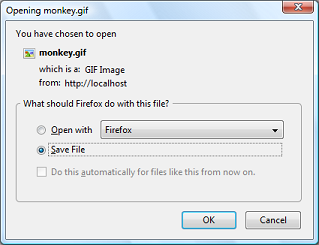
The above example will output something similar to:

Open / Save dialogue
Note:
readfile() will not present any memory issues, even when sending large files, on its own. If you encounter an out of memory error ensure that output buffering is off with ob_get_level().
Tip
A URL can be used as a filename with this function if the fopen wrappers have been enabled. See fopen()for more details on how to specify the filename. See the Supported Protocols and Wrappers for links to information about what abilities the various wrappers have, notes on their usage, and information on any predefined variables they may provide.
Note: Context support was added with PHP 5.0.0. For a description of contexts, refer to Streams.

Thursday, 4 September 2014

PHP: File functions In PHP

This chapter will explain following functions related to files:
  • Opening a file
  • Reading a file
  • Writing a file
  • Closing a file

Opening and Closing Files

The PHP fopen() function is used to open a file. It requires two arguments stating first the file name and then mode in which to operate.
Files modes can be specified as one of the six options in this table.
Mode Purpose
r Opens the file for reading only.
Places the file pointer at the beginning of the file.
r+ Opens the file for reading and writing.
Places the file pointer at the beginning of the file.
w Opens the file for writing only.
Places the file pointer at the beginning of the file.
and truncates the file to zero length. If files does not
exist then it attemts to create a file.
w+ Opens the file for reading and writing only.
Places the file pointer at the beginning of the file.
and truncates the file to zero length. If files does not
exist then it attemts to create a file.
a Opens the file for writing only.
Places the file pointer at the end of the file.
If files does not exist then it attemts to create a file.
a+ Opens the file for reading and writing only.
Places the file pointer at the end of the file.
If files does not exist then it attemts to create a file.
If an attempt to open a file fails then fopen returns a value of false otherwise it returns a file pointer which is used for further reading or writing to that file.
After making a changes to the opened file it is important to close it with the fclose() function. The fclose() function requires a file pointer as its argument and then returns true when the closure succeeds or false if it fails.

Reading a file

Once a file is opened using fopen() function it can be read with a function called fread(). This function requires two arguments. These must be the file pointer and the length of the file expressed in bytes.
The files's length can be found using the filesize() function which takes the file name as its argument and returns the size of the file expressed in bytes.
So here are the steps required to read a file with PHP.
  • Open a file using fopen() function.
  • Get the file's length using filesize() function.
  • Read the file's content using fread() function.
  • Close the file with fclose() function.
The following example assigns the content of a text file to a variable then displays those contents on the web page.
<html>
<head>
<title>Reading a file using PHP</title>
</head>
<body>

<?php
$filename = "/home/user/guest/tmp.txt";
$file = fopen( $filename, "r" );
if( $file == false )
{
   echo ( "Error in opening file" );
   exit();
}
$filesize = filesize( $filename );
$filetext = fread( $file, $filesize );

fclose( $file );

echo ( "File size : $filesize bytes" );
echo ( "<pre>$filetext</pre>" );
?>

</body>
</html>

Writing a file

A new file can be written or text can be appended to an existing file using the PHP fwrite() function. This function requires two arguments specifying a file pointer and the string of data that is to be written. Optionally a third integer argument can be included to specify the length of the data to write. If the third argument is included, writing would will stop after the specified length has been reached.
The following example creates a new text file then writes a short text heading insite it. After closing this file its existence is confirmed using file_exist() function which takes file name as an argument
<?php
$filename = "/home/user/guest/newfile.txt";
$file = fopen( $filename, "w" );
if( $file == false )
{
   echo ( "Error in opening new file" );
   exit();
}
fwrite( $file, "This is  a simple test\n" );
fclose( $file );
?>

<html>
<head>
<title>Writing a file using PHP</title>
</head>
<body>

<?php
if( file_exist( $filename ) )
{
   $filesize = filesize( $filename );
   $msg = "File  created with name $filename ";
   $msg .= "containing $filesize bytes";
   echo ($msg );
}
else
{
   echo ("File $filename does not exit" );
}
?>
</body>
</html>
We have covered all the function related to file input and out in PHP File System Function chapter.