Showing posts with label PHP File Functions. Show all posts

Saturday, 4 October 2014

popen in PHP

popen — Opens process file pointer
Syntax:

resource popen ( string $command , string $mode )
Opens a pipe to a process executed by forking the command given by command.

Parameters:

command
The command

mode
The mode

Return values: Returns a file pointer identical to that returned by fopen(), except that it is unidirectional (may only be used for reading or writing) and must be closed with pclose(). This pointer may be used with fgets(), fgetss(), and fwrite(). When the mode is 'r', the returned file pointer equals to the STDOUT of the command, when the mode is 'w', the returned file pointer equals to the STDIN of the command.

If an error occurs, returns FALSE.


Example #1 popen() example

<?php
$handle = popen("/bin/ls", "r");
?>
If the command to be executed could not be found, a valid resource is returned. This may seem odd, but makes sense; it allows you to access any error message returned by the shell:

Example #2 popen() example

<?php
error_reporting(E_ALL);

/* Add redirection so we can get stderr. */
$handle = popen('/path/to/executable 2>&1', 'r');
echo "'$handle'; " . gettype($handle) . "\n";
$read = fread($handle, 2096);
echo $read;
pclose($handle);
?>


Note:
If you're looking for bi-directional support (two-way), use proc_open().
Note: When safe mode is enabled, you can only execute files within the safe_mode_exec_dir. For practical reasons, it is currently not allowed to have .. components in the path to the executable.
Warning
With safe mode enabled, the command string is escaped with escapeshellcmd(). Thus, echo y | echo x becomes echo y \| echo x.
pclose in PHP

pclose — Closes process file pointer
Syntax:

int pclose ( resource $handle )
Closes a file pointer to a pipe opened by popen().

Parameters:

handle
The file pointer must be valid, and must have been returned by a successful call to popen().

Return values: Returns the termination status of the process that was run. In case of an error then -1 is returned.


Example #1 pclose() example

<?php
$handle = popen('/bin/ls', 'r');
pclose($handle);
?>


Note: Unix Only:
pclose() is internally implemented using the waitpid(3) system call. To obtain the real exit status code the pcntl_wexitstatus() function should be used.

pathinfo in PHP

pathinfo — Returns information about a file path
Syntax:

mixed pathinfo ( string $path [, int $options = PATHINFO_DIRNAME | PATHINFO_BASENAME | PATHINFO_EXTENSION | PATHINFO_FILENAME ] )
pathinfo() returns information about path: either an associative array or a string, depending on options.

Parameters:

path
The path to be parsed.

options
If present, specifies a specific element to be returned; one of PATHINFO_DIRNAME, PATHINFO_BASENAME, PATHINFO_EXTENSION or PATHINFO_FILENAME.

If options is not specified, returns all available elements.

Return values: If the options parameter is not passed, an associative array containing the following elements is returned: dirname, basename, extension (if any), and filename.

Note:
If the path has more than one extension, PATHINFO_EXTENSION returns only the last one and PATHINFO_FILENAME only strips the last one. (see first example below).
Note:
If the path does not have an extension, no extension element will be returned (see second example below).
If options is present, returns a string containing the requested element.

Changelog 

Version Description
5.2.0 The PATHINFO_FILENAME constant was added.


Example #1 pathinfo() Example

<?php
$path_parts = pathinfo('/www/htdocs/inc/lib.inc.php');

echo $path_parts['dirname'], "\n";
echo $path_parts['basename'], "\n";
echo $path_parts['extension'], "\n";
echo $path_parts['filename'], "\n"; // since PHP 5.2.0
?>
The above example will output:

/www/htdocs/inc
lib.inc.php
php
lib.inc
Example #2 pathinfo() example showing difference between null and no extension

<?php
$path_parts = pathinfo('/path/emptyextension.');
var_dump($path_parts['extension']);

$path_parts = pathinfo('/path/noextension');
var_dump($path_parts['extension']);
?>
The above example will output something similar to:

string(0) ""

Notice: Undefined index: extension in test.php on line 6
NULL


Note:
For information on retrieving the current path info, read the section on predefined reserved variables.
Note:
pathinfo() is locale aware, so for it to parse a path containing multibyte characters correctly, the matching locale must be set using the setlocale() function.

fstat in PHP

fstat — Gets information about a file using an open file pointer
Syntax:

array fstat ( resource $handle )
Gathers the statistics of the file opened by the file pointer handle. This function is similar to the stat() function except that it operates on an open file pointer instead of a filename.

Parameters:

handle
A file system pointer resource that is typically created using fopen().

Return values: Returns an array with the statistics of the file; the format of the array is described in detail on the stat() manual page.


Example #1 fstat() example

<?php

// open a file
$fp = fopen("/etc/passwd", "r");

// gather statistics
$fstat = fstat($fp);

// close the file
fclose($fp);

// print only the associative part
print_r(array_slice($fstat, 13));

?>
The above example will output something similar to:

Array
(
    [dev] => 771
    [ino] => 488704
    [mode] => 33188
    [nlink] => 1
    [uid] => 0
    [gid] => 0
    [rdev] => 0
    [size] => 1114
    [atime] => 1061067181
    [mtime] => 1056136526
    [ctime] => 1056136526
    [blksize] => 4096
    [blocks] => 8
)


Note: This function will not work on remote files as the file to be examined must be accessible via the server's filesystem.

fgets in PHP

fgets — Gets line from file pointer
Syntax:

string fgets ( resource $handle [, int $length ] )
Gets a line from file pointer.

Parameters:

handle
The file pointer must be valid, and must point to a file successfully opened by fopen() or fsockopen() (and not yet closed by fclose()).

length
Reading ends when length - 1 bytes have been read, or a newline (which is included in the return value), or an EOF (whichever comes first). If no length is specified, it will keep reading from the stream until it reaches the end of the line.

Note:
Until PHP 4.3.0, omitting it would assume 1024 as the line length. If the majority of the lines in the file are all larger than 8KB, it is more resource efficient for your script to specify the maximum line length.
Return values: Returns a string of up to length - 1 bytes read from the file pointed to by handle. If there is no more data to read in the file pointer, then FALSE is returned.

If an error occurs, FALSE is returned.

Changelog

Version Description
4.3.0 fgets() is now binary safe


Example #1 Reading a file line by line

<?php
$handle = @fopen("/tmp/inputfile.txt", "r");
if ($handle) {
    while (($buffer = fgets($handle, 4096)) !== false) {
        echo $buffer;
    }
    if (!feof($handle)) {
        echo "Error: unexpected fgets() fail\n";
    }
    fclose($handle);
}
?>


Note: If PHP is not properly recognizing the line endings when reading files either on or created by a Macintosh computer, enabling the auto_detect_line_endings run-time configuration option may help resolve the problem.
Note:
People used to the 'C' semantics of fgets() should note the difference in how EOF is returned.

fgetcsv in PHP

fgetcsv — Gets line from file pointer and parse for CSV fields
Syntax:

array fgetcsv ( resource $handle [, int $length = 0 [, string $delimiter = "," [, string $enclosure = '"' [, string $escape = "\\" ]]]] )
Similar to fgets() except that fgetcsv() parses the line it reads for fields in CSV format and returns an array containing the fields read.

Parameters:

handle
A valid file pointer to a file successfully opened by fopen(), popen(), or fsockopen().

length
Must be greater than the longest line (in characters) to be found in the CSV file (allowing for trailing line-end characters). It became optional in PHP 5. Omitting this parameter (or setting it to 0 in PHP 5.1.0 and later) the maximum line length is not limited, which is slightly slower.

delimiter
Set the field delimiter (one character only).

enclosure
Set the field enclosure character (one character only).

escape
Set the escape character (one character only). Defaults as a backslash.

Return values: Returns an indexed array containing the fields read.

Note:
A blank line in a CSV file will be returned as an array comprising a single null field, and will not be treated as an error.
Note: If PHP is not properly recognizing the line endings when reading files either on or created by a Macintosh computer, enabling the auto_detect_line_endings run-time configuration option may help resolve the problem.
fgetcsv() returns NULL if an invalid handle is supplied or FALSE on other errors, including end of file.

Changelog 

Version Description
5.3.0 The escape parameter was added
5.1.0 The length is now optional. Default is 0, meaning no length limit.
4.3.5 fgetcsv() is now binary safe


Example #1 Read and print the entire contents of a CSV file

<?php
$row = 1;
if (($handle = fopen("test.csv", "r")) !== FALSE) {
    while (($data = fgetcsv($handle, 1000, ",")) !== FALSE) {
        $num = count($data);
        echo "<p> $num fields in line $row: <br /></p>\n";
        $row++;
        for ($c=0; $c < $num; $c++) {
            echo $data[$c] . "<br />\n";
        }
    }
    fclose($handle);
}
?>


Note:
Locale setting is taken into account by this function. If LANG is e.g. en_US.UTF-8, files in one-byte encoding are read wrong by this function.

fgetc in PHP

fgetc — Gets character from file pointer
Syntax:

string fgetc ( resource $handle )
Gets a character from the given file pointer.

Parameters:

handle
The file pointer must be valid, and must point to a file successfully opened by fopen() or fsockopen() (and not yet closed by fclose()).

Return values: Returns a string containing a single character read from the file pointed to by handle. Returns FALSE on EOF.

Warning
This function may return Boolean FALSE, but may also return a non-Boolean value which evaluates to FALSE. Please read the section on Booleans for more information. Use the === operator for testing the return value of this function.


Example #1 A fgetc() example

<?php
$fp = fopen('somefile.txt', 'r');
if (!$fp) {
    echo 'Could not open file somefile.txt';
}
while (false !== ($char = fgetc($fp))) {
    echo "$char\n";
}
?>


Note: This function is binary-safe.

feof in PHP

feof — Tests for end-of-file on a file pointer
Syntax:

bool feof ( resource $handle )
Tests for end-of-file on a file pointer.

Parameters:

handle
The file pointer must be valid, and must point to a file successfully opened by fopen() or fsockopen() (and not yet closed by fclose()).

Return values: Returns TRUE if the file pointer is at EOF or an error occurs (including socket timeout); otherwise returns FALSE.


Warning
If a connection opened by fsockopen() wasn't closed by the server, feof() will hang. To workaround this, see below example:
Example #1 Handling timeouts with feof()
<?php
function safe_feof($fp, &$start = NULL) {
 $start = microtime(true);

 return feof($fp);
}

/* Assuming $fp is previously opened by fsockopen() */

$start = NULL;
$timeout = ini_get('default_socket_timeout');

while(!safe_feof($fp, $start) && (microtime(true) - $start) < $timeout)
{
 /* Handle */
}
?>
Warning
If the passed file pointer is not valid you may get an infinite loop, because feof() fails to return TRUE.
Example #2 feof() example with an invalid file pointer
<?php
// if file can not be read or doesn't exist fopen function returns FALSE
$file = @fopen("no_such_file", "r");

// FALSE from fopen will issue warning and result in infinite loop here
while (!feof($file)) {
}

fclose($file);
?>

fclose in PHP

fclose — Closes an open file pointer
Syntax:

bool fclose ( resource $handle )
The file pointed to by handle is closed.

Parameters:

handle
The file pointer must be valid, and must point to a file successfully opened by fopen() or fsockopen().

Return values: Returns TRUE on success or FALSE on failure.


Example #1 A simple fclose() example

<?php

$handle = fopen('somefile.txt', 'r');

fclose($handle);

?>

copy in PHP

copy — Copies file

Syntax:

bool copy ( string $source , string $dest [, resource $context ] )
Makes a copy of the file source to dest.

If you wish to move a file, use the rename() function.

Parameters:

source
Path to the source file.

dest
The destination path. If dest is a URL, the copy operation may fail if the wrapper does not support overwriting of existing files.

Warning
If the destination file already exists, it will be overwritten.
context
A valid context resource created with stream_context_create().

Return values: Returns TRUE on success or FALSE on failure.

Changelog 

Version Description
5.3.0 Added context support.
4.3.0 Both source and dest may now be URLs if the "fopen wrappers" have been enabled. See fopen() for more details.


Example #1 copy() example

<?php
$file = 'example.txt';
$newfile = 'example.txt.bak';

if (!copy($file, $newfile)) {
    echo "failed to copy $file...\n";
}
?>

Friday, 3 October 2014

chmod in PHP

chmod — Changes file mode
Syntax:

bool chmod ( string $filename , int $mode )
Attempts to change the mode of the specified file to that given in mode.

Parameters:

filename
Path to the file.

mode
Note that mode is not automatically assumed to be an octal value, so to ensure the expected operation, you need to prefix mode with a zero (0). Strings such as "g+w" will not work properly.

<?php
chmod("/somedir/somefile", 755);   // decimal; probably incorrect
chmod("/somedir/somefile", "u+rwx,go+rx"); // string; incorrect
chmod("/somedir/somefile", 0755);  // octal; correct value of mode
?>
The mode parameter consists of three octal number components specifying access restrictions for the owner, the user group in which the owner is in, and to everybody else in this order. One component can be computed by adding up the needed permissions for that target user base. Number 1 means that you grant execute rights, number 2 means that you make the file writeable, number 4 means that you make the file readable. Add up these numbers to specify needed rights. You can also read more about modes on Unix systems with 'man 1 chmod' and 'man 2 chmod'.

<?php
// Read and write for owner, nothing for everybody else
chmod("/somedir/somefile", 0600);

// Read and write for owner, read for everybody else
chmod("/somedir/somefile", 0644);

// Everything for owner, read and execute for others
chmod("/somedir/somefile", 0755);

// Everything for owner, read and execute for owner's group
chmod("/somedir/somefile", 0750);
?>
Return values: Returns TRUE on success or FALSE on failure.


Note:
The current user is the user under which PHP runs. It is probably not the same user you use for normal shell or FTP access. The mode can be changed only by user who owns the file on most systems.
Note: This function will not work on remote files as the file to be examined must be accessible via the server's filesystem.
Note:
When safe mode is enabled, PHP checks whether the files or directories you are about to operate on have the same UID (owner) as the script that is being executed. In addition, you cannot set the SUID, SGID and sticky bits.

readfile in PHP

readfile — Outputs a file
Syntax:int readfile ( string $filename [, bool $use_include_path = false [, resource $context ]] )

Reads a file and writes it to the output buffer.

Parameters :

filename:The filename being read.

use_include_path:You can use the optional second parameter and set it to TRUE, if you want to search for the file in theinclude_path, too.

context:A context stream resource.

Return Values : Returns the number of bytes read from the file. If an error occurs, FALSE is returned and unless the function was called as @readfile(), an error message is printed.

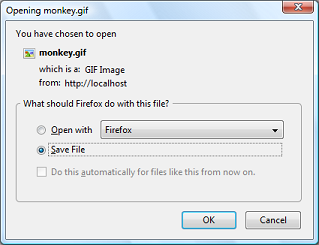
Example #1 Forcing a download using readfile()

<?php

$file = 'monkey.gif';

if (file_exists($file)) {

header('Content-Description: File Transfer');

header('Content-Type: application/octet-stream');

header('Content-Disposition: attachment; filename='.basename($file));

header('Expires: 0');

header('Cache-Control: must-revalidate');

header('Pragma: public');

header('Content-Length: ' . filesize($file));

readfile($file);

exit;

}

?>

The above example will output something similar to:

Open / Save dialogue
Note:
readfile() will not present any memory issues, even when sending large files, on its own. If you encounter an out of memory error ensure that output buffering is off with ob_get_level().
Tip
A URL can be used as a filename with this function if the fopen wrappers have been enabled. See fopen()for more details on how to specify the filename. See the Supported Protocols and Wrappers for links to information about what abilities the various wrappers have, notes on their usage, and information on any predefined variables they may provide.
Note: Context support was added with PHP 5.0.0. For a description of contexts, refer to Streams.

Thursday, 4 September 2014

PHP: File functions In PHP

This chapter will explain following functions related to files:
  • Opening a file
  • Reading a file
  • Writing a file
  • Closing a file

Opening and Closing Files

The PHP fopen() function is used to open a file. It requires two arguments stating first the file name and then mode in which to operate.
Files modes can be specified as one of the six options in this table.
Mode Purpose
r Opens the file for reading only.
Places the file pointer at the beginning of the file.
r+ Opens the file for reading and writing.
Places the file pointer at the beginning of the file.
w Opens the file for writing only.
Places the file pointer at the beginning of the file.
and truncates the file to zero length. If files does not
exist then it attemts to create a file.
w+ Opens the file for reading and writing only.
Places the file pointer at the beginning of the file.
and truncates the file to zero length. If files does not
exist then it attemts to create a file.
a Opens the file for writing only.
Places the file pointer at the end of the file.
If files does not exist then it attemts to create a file.
a+ Opens the file for reading and writing only.
Places the file pointer at the end of the file.
If files does not exist then it attemts to create a file.
If an attempt to open a file fails then fopen returns a value of false otherwise it returns a file pointer which is used for further reading or writing to that file.
After making a changes to the opened file it is important to close it with the fclose() function. The fclose() function requires a file pointer as its argument and then returns true when the closure succeeds or false if it fails.

Reading a file

Once a file is opened using fopen() function it can be read with a function called fread(). This function requires two arguments. These must be the file pointer and the length of the file expressed in bytes.
The files's length can be found using the filesize() function which takes the file name as its argument and returns the size of the file expressed in bytes.
So here are the steps required to read a file with PHP.
  • Open a file using fopen() function.
  • Get the file's length using filesize() function.
  • Read the file's content using fread() function.
  • Close the file with fclose() function.
The following example assigns the content of a text file to a variable then displays those contents on the web page.
<html>
<head>
<title>Reading a file using PHP</title>
</head>
<body>

<?php
$filename = "/home/user/guest/tmp.txt";
$file = fopen( $filename, "r" );
if( $file == false )
{
   echo ( "Error in opening file" );
   exit();
}
$filesize = filesize( $filename );
$filetext = fread( $file, $filesize );

fclose( $file );

echo ( "File size : $filesize bytes" );
echo ( "<pre>$filetext</pre>" );
?>

</body>
</html>

Writing a file

A new file can be written or text can be appended to an existing file using the PHP fwrite() function. This function requires two arguments specifying a file pointer and the string of data that is to be written. Optionally a third integer argument can be included to specify the length of the data to write. If the third argument is included, writing would will stop after the specified length has been reached.
The following example creates a new text file then writes a short text heading insite it. After closing this file its existence is confirmed using file_exist() function which takes file name as an argument
<?php
$filename = "/home/user/guest/newfile.txt";
$file = fopen( $filename, "w" );
if( $file == false )
{
   echo ( "Error in opening new file" );
   exit();
}
fwrite( $file, "This is  a simple test\n" );
fclose( $file );
?>

<html>
<head>
<title>Writing a file using PHP</title>
</head>
<body>

<?php
if( file_exist( $filename ) )
{
   $filesize = filesize( $filename );
   $msg = "File  created with name $filename ";
   $msg .= "containing $filesize bytes";
   echo ($msg );
}
else
{
   echo ("File $filename does not exit" );
}
?>
</body>
</html>
We have covered all the function related to file input and out in PHP File System Function chapter.
