Write a JavaScript function to get the first element of an array. Passing a parameter 'n' will return the first 'n' elements of the array.
Test Data:
console.log(array_Clone([1, 2, 4, 0]));
console.log(array_Clone([1, 2, [4, 0]]));
[1, 2, 4, 0]
[1, 2, [4, 0]]
console.log(array_Clone([1, 2, 4, 0]));
console.log(array_Clone([1, 2, [4, 0]]));
[1, 2, 4, 0]
[1, 2, [4, 0]]
Pictorial Presentation:
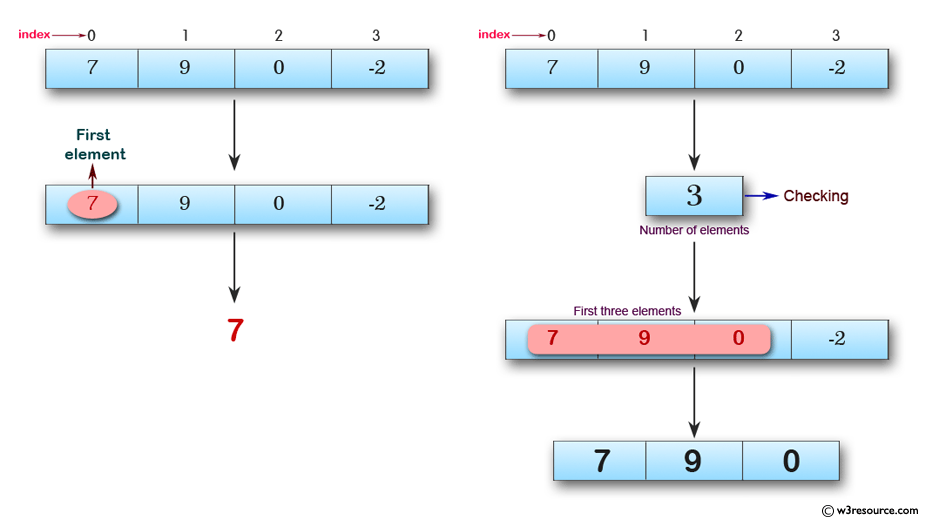
Sample Solution:
HTML Code:
<!DOCTYPE html>
<html>
<head>
<meta charset="utf-8">
<title>Get the first element of an array</title>
</head>
<body>
</body>
</html>
JavaScript Code:
var first = function(array, n) {
if (array == null)
return void 0;
if (n == null)
return array[0];
if (n < 0)
return [];
return array.slice(0, n);
};
console.log(first([7, 9, 0, -2]));
console.log(first([],3));
console.log(first([7, 9, 0, -2],3));
console.log(first([7, 9, 0, -2],6));
console.log(first([7, 9, 0, -2],-3));
Sample Output:
7
[]
[7,9,0]
[7,9,0,-2]
[]
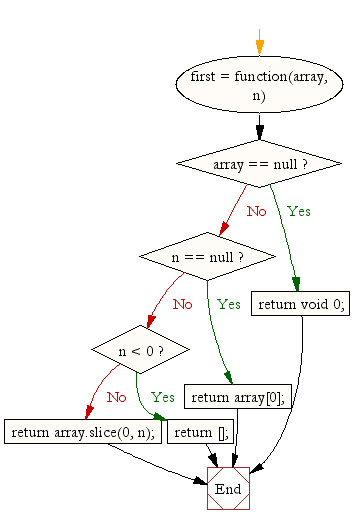
Flowchart:


 Posts
Posts



0 comments:
Post a Comment